AgentExchange

Help & Support

Elevate Your Agents with AgentExchange Solutions
Easily enhance Agentforce with pre-built AI solutions from AgentExchange. Browse, install, and deploy agents, actions, and apps directly into your environment. Tell Me More

Have Questions?

Chatter RSS

Chatter RSS allows you to integrate rss data from trusted sources into you

Overview

See How Chatter RSS Works

  • Integrate RSS data feeds with Chatter

  • Easily Configurable UI and Automated Retreival

  • Native App, easily installed

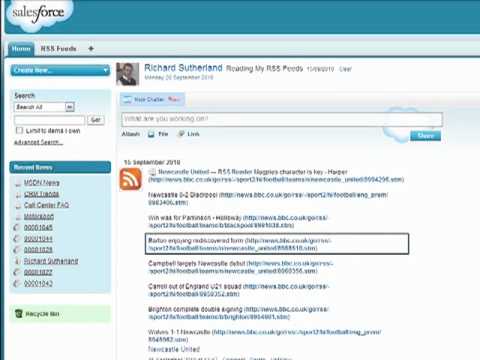
Chatter RSS, or RSS 2 Chatter, allows you to configure RSS data/news feeds and users to then follow the feeds. Following a feed means that posts will be visible in the user's chatter feed. Feeds can be displayed in two ways in the chatter feed, rolled up, where all news items are presented in a single post. Alternatively each news item from an RSS source can be posted as individual chatter posts. The app ships with two schedulable APEX classes. An administator can use these to import the RSS data at regular intervals, and to run a clean up process to remove older posts (Optional). Version 2 now supports ATOM feeds. It also allows you to link a feed to an account, a Campaign or an Opportunity. Please see the data sheet for setup instructions once installed

Categories

Business Needs
Chat & Web Conferencing
Features
Native App
Built exclusively on the Salesforce Platform, ensuring reliability and performance.
Lightning Ready
Optimized for Salesforce orgs that use Lightning Ready.
Editable Code
This product is installed as an unmanaged package in your Salesforce org and its code is available to view and modify.
Native App
Lightning Ready
Editable Code

More from

  • View the journey a contact, lead, case, or account is in, directly from Marketing Cloud Engagement. Give visibility to your entire company on how your customers are being contacted and make the right decision at the right time
  • Issue Box allows users to report issues along with critical session details. The user will add additional details about the error and, once saved, a Chatter alert will be sent to the admin.
  • Procurement for AppExchange enables companies to standardize purchase requests, streamline purchasing processes, and gather data to support requests for preferred pricing from vendors.
  • Recruiting Manager for AppExchange offers a structured, consolidated way to track and manage the recruiting process, so organizations have easy access to information about openings, applicants, candidates, and hiring goals.
  • Users can add multiple records in one go to any Junction object with this component given that there is a junction object connecting two objects with a Master-detail relationship.
  • Analyze and manage security across all of your Salesforce Orgs. Multi-Org Security Summary gives you the ability to manage and support security settings across multiple environments natively on Salesforce.
  • This Einstein Analytics template helps you visualize the accuracy of you Einstein Language Intent Models. You can quickly identify specific labels and utterances your model is struggling to classify.
  • A simple flow to allow users to query the Charity Commission API and update their Account details with information found there. In addition a hyperlink on Account will then that the user to the relevant page on the Charity Commissions website.
  • Analytics assets linkage Dataset metadata Row counts in datasets
  • Checklist manager is a lightning component which is used to show a checklist (to-do list) of action items on any object record page.