
Put quotable facts in the fields assistants can read: title, SEO title, tagline, and brief description (Salesforce). Front-load what the product does, which Salesforce products it works with, and its category. Write each highlight as a complete answer, add FAQs to the full description, publish numeric pricing, and caption every image. Google and AgentExchange search read the same text, so you do not keep a second version for SEO.
How-to Article
5 min read
This guide is for Salesforce ISV partners who own an AgentExchange listing.
How do AI assistants decide which listing to cite?
AI assistants cite the listing that answers a buyer’s question most directly, in clear, well-structured text.
They are not reading your screenshots or inferring a price from “Contact us.” They read the plain-text fields near the top of the page: listing title, SEO title, tagline, and brief description
Pricing shows why the missing fact matters. In a Growth Memo and Siteline study, AI agents researched 100 B2B products. When no real price was disclosed, 45% of pricing runs cited at least one third-party source, compared with 18% when a numeric public price was available
The same sentences are what the other surfaces use. Google often uses those fields for title links and snippets, and AgentExchange scores keyword relevance against the same listing text, with the title, brief description, highlights, and publisher name carrying the most weight
There isn’t a separate SEO version of your listing. Write it once. That same text is what an assistant cites, a search engine titles, and marketplace search matches.
A few rules follow from how citation works:
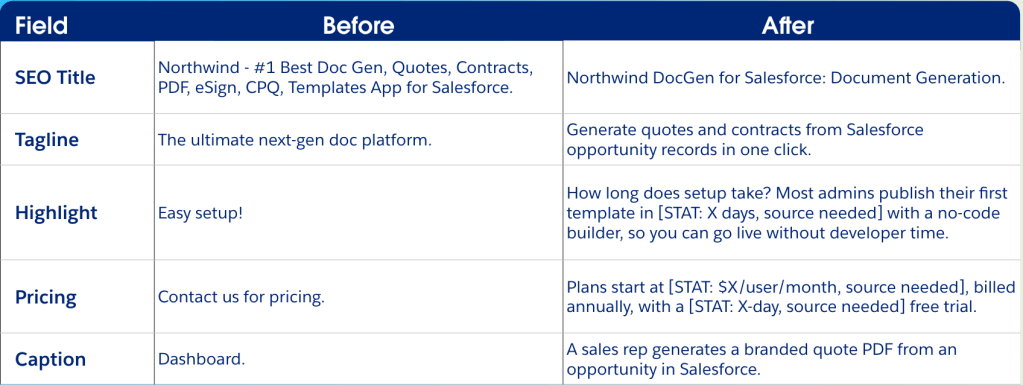
- Answer the question in the sentence. “Easy setup!” does nothing for you. Instead, try: “Most admins publish their first template in [STAT: X days, source needed] with a no-code builder”.
- Name real things. Integrations, certifications, supported editions, and Salesforce products are what buyers ask about and what assistants match on.
- Put figures in the text, not in an image: prices, time savings, setup time, and results, each with a source when you have one. Citable facts lift AI visibility, and anything inside an image is invisible to most AI crawlers, so caption every image with a full sentence.
- Use the buyer’s words, including the longer question-style phrases showing up in AgentExchange search. Those belong in highlights and FAQs, not in a second keyword list. Repeating a keyword does not improve ranking
What to write, field by field
Each field is a sentence an assistant can lift. Keep this open next to the Partner Console.
- Listing title. Product name plus what it does, in title case, no special characters: “[Product Name]: [what it does, in the words a buyer would use].”
- SEO title. The same message, cut to under 55 characters so it isn’t truncated before an assistant or Google uses it. One idea, not a list of keywords. Google truncates long titles and treats keyword stuffing as spammy.
- Tagline. One sentence with a verb, an outcome, and Salesforce context. An assistant will often paraphrase this line first.
- Brief description. In the first 160 characters: what it does, one differentiator, and one result if you have a sourced number. Name the Salesforce products it works with. This block feeds both the AI summary and the search snippet.
- Highlights. One complete answer each, written to a question a buyer would ask an assistant: “[Capability] so you can [outcome].” Use these for conversational, long-tail phrasing.
- Full description. Expand the same answers. Add FAQs in question-and-answer form so a longer prompt has a passage to cite. If you have commissioned or attributable data, put it here with the source.
- Images. In-product screenshots, proof points, and integrations. Caption each one with a full sentence that says what is happening. The caption is the only part an assistant can read.
- Pricing (ISV). Two to four tiers with name, price and currency, units, billing frequency, and trial length. In additional pricing details, add what buyers ask next: add-ons, annual vs. monthly, discounts, and who to contact. “Contact us for pricing” hands the citation to a third party.
- The rest of the record. Add the demo video link in Include Visuals, or the demo CTA will not work. Give customer resources descriptive file names. In the provider bio, include founding year, geography, certifications, and awards, plus a Knowledge Center URL if you have one. On ISV listings, assign up to three categories and your supported industries, since buyers filter on them. Turn on every CTA. Lead capture is set listing by listing, with no global toggle
- Reviews and recent versions are trust signals, and ratings feed AgentExchange’s trust score. Ask for reviews steadily and keep shipping updates. Refresh the copy every three to six months, since features, prices, and review counts change.
See a listing example
Example: Northwind DocGen is a fictional ISV, and none of these figures are real. Swap in your own product, your own wording, and sourced numbers before publishing.
How to tell it’s working
Record the date your rewrite goes live. Everything below is a comparison against the period before it.
Leads are still the outcome. Salesforce’s lead routing guide identifies AgentExchange leads by a Lead Source that contains “SFDC.” Track leads by type monthly and lead-to-pipeline conversion quarterly.
- This week, do it once by hand. Paste the listing into an assistant and ask it to explain the product and the price. Rewrite the field it gets wrong.
- Confirm the same words are what buyers already use. In Marketplace Analytics, check the keywords driving the most views and make sure they appear in the title, tagline, brief description, and full description. Search Google for the listing name and confirm the title isn’t cut off.
- Once a quarter, ask ChatGPT, Perplexity, Gemini, and Google the same buyer questions. Log whether your product is named, whether the description is right, and whether the price quoted is yours or a third party’s. Tools like Profound or Palmata can run the panel on a schedule.
For more, see the guides on the
Frequently asked questions
How do I optimize my AgentExchange listing for AI answers?
How long should my SEO title be?
Under 55 characters, one clear message. A long title gets truncated before it can be used as a title link or a citation.
Do reviews affect whether we get cited?
Ratings are a trust signal. They factor into AgentExchange search, buyers can filter by them, and your rating and review count can appear in organic results. AgentExchange doesn't remove negative reviews unless there's a blatant violation of its terms of use, so respond to them.
How often should I update the listing?
Every three to six months. An outdated feature, price, or integration is what an assistant will repeat (Salesforce).